Story Path: AI Plot Generator to Beat Writer's Block
Story Path is an AI-powered story planning app that turns a simple idea into branching plot options, helping writers break through writer's block and outline faster.
Overview
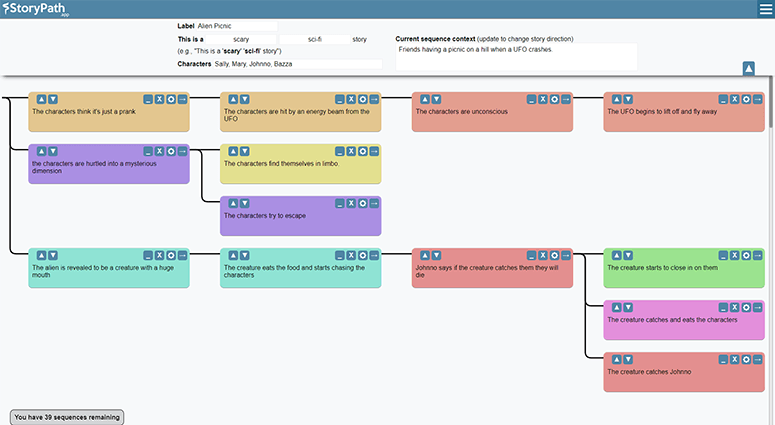
Story Path is an AI-driven book planning tool built for writers who get stuck staring at a blank page. Instead of forcing you to invent an entire plot from scratch, it takes a brief description of your idea and instantly generates multiple branching plot paths you can explore, mix, and refine. This turns vague, scattered inspiration into a structured narrative outline in minutes rather than days.
What sets Story Path apart is its emphasis on flexibility and creative control. Writers aren't locked into a single AI-generated storyline; they can expand favorite branches, layer in their own twists, and color-code sequences to visually track different narrative threads. Once a path feels right, it can be exported as a PDF or Word document, making it easy to move straight into drafting.
Designed for novelists, screenwriters, short story authors, and everyone from first-time writers to published pros, Story Path also connects with its companion app, SceneOne.app, which adds AI-assisted scene writing to the mix. Together, they form a lightweight ecosystem for planning and writing stories without losing your personal creative voice.
Capabilities & Features
- Book planning
- Writer's block
- AI writing assistant
- Plot generation
- Story outlining
- Novel writing
- Screenwriting
- Writing software
- Brainstorming
- Story development
Core Features
- AI-powered plot generation from brief idea descriptions
- Branching plot options to explore multiple story directions
- Fully customizable paths with room for personal creative input
- Color-coded sequences for easy visual tracking of narrative threads
- Export finished outlines to PDF or Word Doc
- Companion app integration with SceneOne.app for AI-assisted scene writing
Use Cases
- Generating the next scene or plot beat when a story stalls
- Breaking through writer's block quickly and getting back to drafting
- Turning a vague or random idea into a coherent, structured narrative
- Outlining full-length novels, screenplays, or individual chapters/scenes
- Brainstorming 'what if' scenarios to explore alternate plot directions
Best For
- Novelists
- Screenwriters
- Short story writers
- Creative writers
- Beginner writers exploring their first story
- Published authors looking to speed up outlining
Pros
- •Quickly generates multiple plot directions from minimal input
- •Branching structure encourages creative exploration rather than a single rigid outline
- •Customization options let writers keep their unique voice and ideas
- •Color-coded sequences make complex outlines easier to navigate
- •Export functionality integrates smoothly into existing writing workflows
- •Companion app (SceneOne.app) extends functionality into actual scene writing
Cons
- •AI-generated suggestions may require significant editing to match a writer's specific style or voice
- •Relies on the user providing clear initial input to generate useful plot branches
- •No pricing information publicly listed, making it unclear what's free vs. paid
- •May not suit writers who prefer fully manual, freeform outlining methods
How to Use
Start by entering a short description of your story idea or current plot point. Story Path will generate several branching plot options based on that input. Browse the suggested paths, expand the ones that resonate with you, and customize them by adding your own details, twists, or inspiration. Use the color-coded sequences to keep track of different narrative branches as your outline grows. When you're happy with your story path, export it as a PDF or Word document to use as your writing roadmap—or pick and choose specific sequences to include in the export.
Frequently Asked Questions
Pricing
Pricing details are not currently published, so prospective users will need to check the app directly for plan options and costs.
Pricing data is provided as a summary. Visit the vendor website for full tier details.