Pebblely: AI Product Photo & Background Generator
Pebblely turns plain product shots into polished marketing photos using AI-generated backgrounds, shadows, and reflections in seconds.
Overview
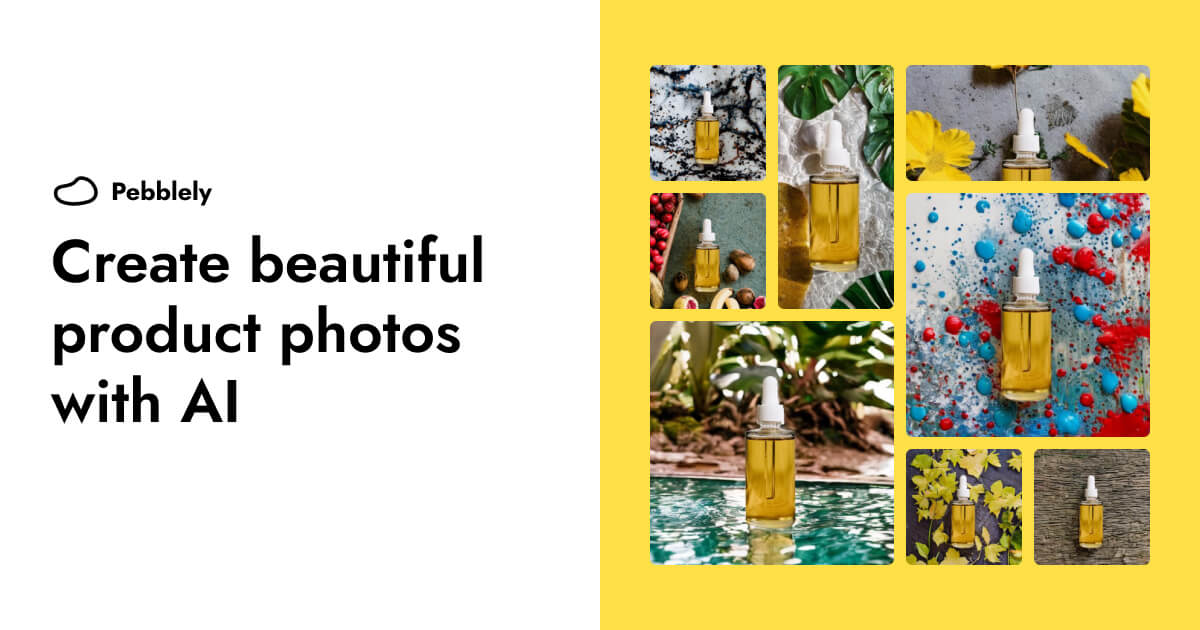
Pebblely is an AI-driven photo editing platform built specifically for brands that need professional-looking product imagery without the cost of a studio shoot. Simply upload a photo of your product, and Pebblely automatically strips away the background, then generates a brand-new scene complete with realistic shadows and reflections. With over 40 built-in themes or the option to describe a custom setting, businesses can produce diverse, on-brand visuals for every platform imaginable.
Beyond single-image edits, Pebblely is designed to scale. Teams can generate large batches of product photos at once through bulk generation tools or connect directly via API for automated workflows. Additional editing capabilities—like moving or resizing products, extending images to fit any aspect ratio, removing unwanted objects, reusing favorite backgrounds, and layering on logos or badges—give users granular control over the final output.
Whether you're an e-commerce seller prepping listings, a marketer building ad creatives, or a social media manager needing fresh content daily, Pebblely eliminates the bottleneck of traditional photography while keeping visuals consistent and conversion-ready.
Capabilities & Features
- AI product photography
- AI image generator
- Background removal
- Image editing
- Marketing assets
- Product photos
- AI design tool
Core Features
- AI-powered background generation with 40+ themes
- One-click background removal
- AI image editing (move, resize, extend, remove objects)
- Bulk image generation for large catalogs
- Developer API for programmatic, automated workflows
- Logo and badge overlay tools
Use Cases
- Creating polished marketplace listing photos for Amazon, Etsy, or Shopify
- Generating scroll-stopping social media content
- Designing consistent website product imagery
- Producing branded email marketing banners
- Crafting high-converting ad creatives for paid campaigns
Best For
- E-commerce businesses
- Marketing teams
- Product photographers
- Social media managers
- Graphic designers
- Entrepreneurs and small business owners
Pros
- •Removes the need for expensive studio photography and physical props
- •Generates realistic shadows and reflections automatically
- •Scales easily with bulk generation and API access
- •Wide variety of ready-made background themes plus custom scene descriptions
- •Extra editing tools (resize, extend, remove objects) reduce reliance on separate design software
Cons
- •Free plan is capped at only 40 images per month, limiting testing for larger catalogs
- •Image resolution on the free tier is limited to 1024x1024
- •Unlimited image generation requires upgrading to the priciest Pro plan
- •Some policy details, like data usage for training and refund terms, aren't clearly disclosed
How to Use
1. Upload a photo of your product to Pebblely. 2. Let the AI automatically remove the existing background. 3. Choose from 40+ preset themes or type a description of the scene you want. 4. Pebblely generates the new background complete with matching shadows and reflections. 5. Fine-tune the result by moving, resizing, or repositioning the product, adding logos/badges, or extending the canvas size. 6. Use bulk generation or the API to scale the process across your entire product catalog.
Frequently Asked Questions
Pricing
Pebblely offers a free plan with 40 monthly images, with paid tiers starting at $15/month for 1,000 images and custom backgrounds, up to $32/month for unlimited images and priority support.
Pricing data is provided as a summary. Visit the vendor website for full tier details.