Palette.fm: AI Photo Colorizer for B&W Images
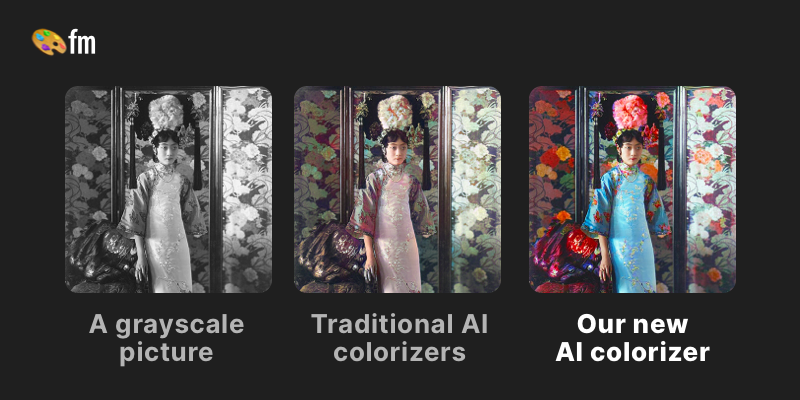
Palette.fm uses AI to instantly transform black and white photos into vibrant, lifelike color images with just a few clicks.
Overview
Palette.fm is an AI-driven colorization tool that breathes new life into monochrome photographs by adding realistic, vibrant color in mere seconds. Whether you're reviving decades-old family portraits or giving historical images a fresh visual perspective, Palette's automatic engine analyzes your black and white photo and applies natural-looking color transformations without requiring any technical skill or account creation for basic use. The platform offers multiple color filter styles, letting users experiment with different tones and moods until they find the perfect match for their image. For those needing more control, keyword-based customization allows fine-tuning of specific colors within a photo, ensuring skies, skin tones, clothing, and landscapes look authentic rather than artificially tinted. Beyond casual use, Palette.fm caters to professionals through API access for integration into larger workflows, and paid tiers unlock watermark-free, high-resolution downloads ideal for print, publication, or professional archives. Its blend of simplicity and depth makes it a versatile tool for restoring memories, enriching creative projects, and streamlining photo editing pipelines.
Capabilities & Features
- AI colorization
- Photo restoration
- Black and white to color
- Image enhancement
- Online tool
- AI photo editor
- Color filters
Core Features
- Automatic AI-powered colorization of black and white photos
- Multiple color filter presets for varied stylistic results
- Keyword-based customization for precise color control
- Watermark-free, high-resolution exports with paid credits
- API access for developers and business integrations
Use Cases
- Restoring and colorizing old family photographs
- Bringing historical and archival images to life
- Creating eye-catching, colorized content for social media posts
- Enhancing black and white film stills for creative projects
- Colorizing architectural, landscape, or portrait photography
Best For
- Photographers
- Historians
- Genealogists
- Content creators
- Designers
- Social media managers
- Photoshop users
Pros
- •Fast, automatic colorization requires no technical expertise
- •No sign-up needed to try basic colorization previews
- •Keyword customization allows fine-tuned, realistic color results
- •Offers API access for scalable, integrated use cases
- •Flexible pricing with one-time payment or subscription options
Cons
- •Free tier limits images to low resolution (500x500px) with watermarks
- •Full-resolution, watermark-free outputs require paid credits
- •Per-credit costs can add up for high-volume users
- •Advanced color accuracy may still require manual keyword tweaking for best results
How to Use
1. Upload your black and white photo to Palette.fm. 2. Browse and select from the available color filter presets to preview different colorization styles. 3. Optionally, refine the results by entering specific keywords to adjust colors for particular elements in the image. 4. Preview your colorized photo (watermarked at lower resolution on the free tier). 5. Purchase credits or subscribe to download a full-resolution, watermark-free version. 6. For developers, integrate Palette's API into your own applications for automated colorization at scale.
Frequently Asked Questions
Connect & Contact
Pricing
Palette.fm offers a free trial with one full-resolution credit, plus paid options including a $72/year subscription (480 credits) or a one-time $49 payment for 75 credits valid over two years.
Pricing data is provided as a summary. Visit the vendor website for full tier details.