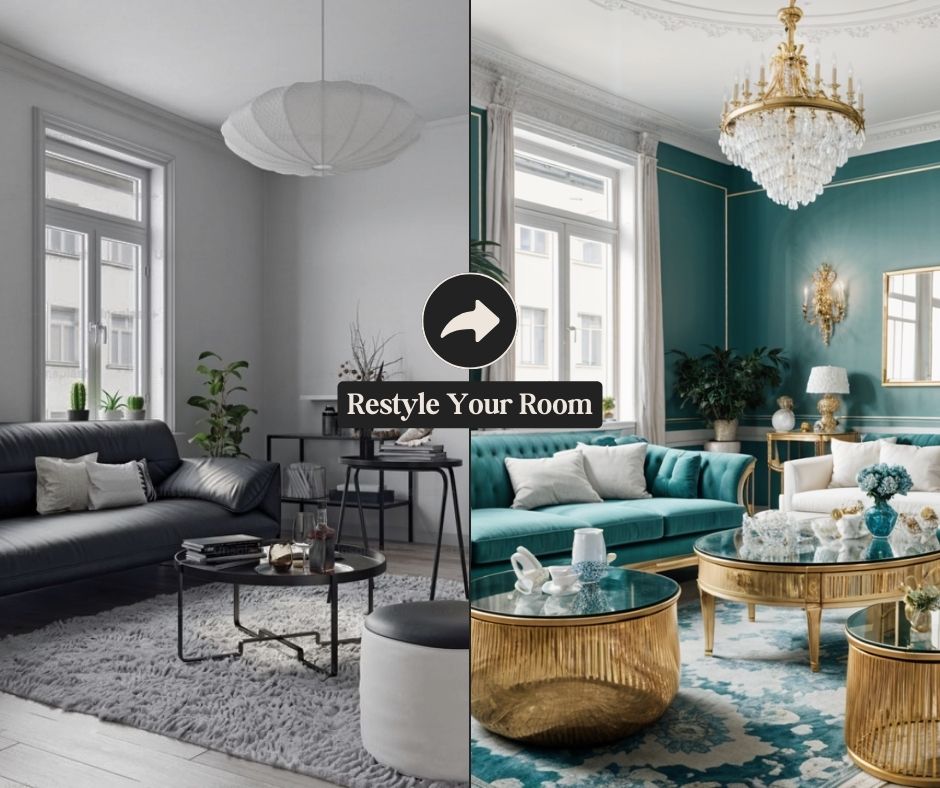
Design My Room: AI Room Redesign App for iPhone
Snap a photo of any room and let AI generate five stunning redesign concepts in seconds.
Overview
Design My Room transforms the way you approach home makeovers by turning a single photo into a springboard for creativity. Simply capture or upload an image of your space, and the app's AI engine instantly produces five unique design concepts tailored to your room's layout and features. No design experience, sketching, or complicated software required—just point, shoot, and discover fresh possibilities for your space.
Whether you're staring at a dated living room, a bland bedroom, or an uninspired home office, this iPhone app removes the guesswork from interior design. It analyzes your actual room and generates realistic, personalized suggestions rather than generic stock photos, making it easier to visualize how different styles, colors, and layouts could work in your real environment. It's a fast, low-effort way to spark ideas before committing to paint, furniture, or a full renovation.
Capabilities & Features
- AI interior design
- Room redesign
- Home decor
- Interior design inspiration
- AI design
- Home makeover
- iPhone app
Core Features
- AI-powered room redesign from a single photo
- Generates 5 distinct design options per upload
- Simple photo capture or upload workflow
- Room-specific design inspiration (not generic templates)
- Fast, seconds-long processing time
- Native iPhone app experience
Use Cases
- Redesigning a living room before a furniture refresh
- Remodeling a bedroom to match a new style or mood
- Decorating a home office for better productivity and aesthetics
- Gathering interior design inspiration before hiring a professional
- Helping real estate agents visualize staging concepts for listings
Best For
- Homeowners planning a makeover
- Interior design enthusiasts
- Renters looking for temporary styling ideas
- Real estate agents staging properties
- DIY decorators on a budget
Pros
- •Delivers results in seconds with minimal effort
- •No design skills or software knowledge needed
- •Generates multiple design variations per photo for more options
- •Uses your actual room, making suggestions more realistic and actionable
- •Simple, intuitive photo-based workflow
Cons
- •Currently limited to iPhone users only
- •Only offers 5 design options per photo, which may limit variety for some users
- •AI-generated designs may not always account for budget or furniture availability
- •No stated option to fine-tune or customize generated designs further
How to Use
1. Open the Design My Room app on your iPhone. 2. Take a new photo of the room you want to redesign, or upload an existing picture from your camera roll. 3. Wait a few seconds while the AI processes your image. 4. Browse through 5 unique, AI-generated design concepts created specifically for your room. 5. Use the ideas as inspiration for your next home makeover project.
Frequently Asked Questions
Open in AI Studio
Ask our AI to evaluate if Design My Room fits your specific workflow.
Pricing
Specific pricing details are not published, so prospective users should check the App Store listing directly for current subscription or purchase costs.
Pricing data is provided as a summary. Visit the vendor website for full tier details.